Every contact centre runs on knowledge. When agents find the right answer quickly, customers leave satisfied and costs stay under control. When they cannot, handling times grow, transfers increase and customers hear different answers from different people.
A Knowledge Management System (KMS) is a platform that captures, organises and delivers trusted information to the people who need it. In a contact centre, a KMS gives every agent the right answer at the right time, across every channel.
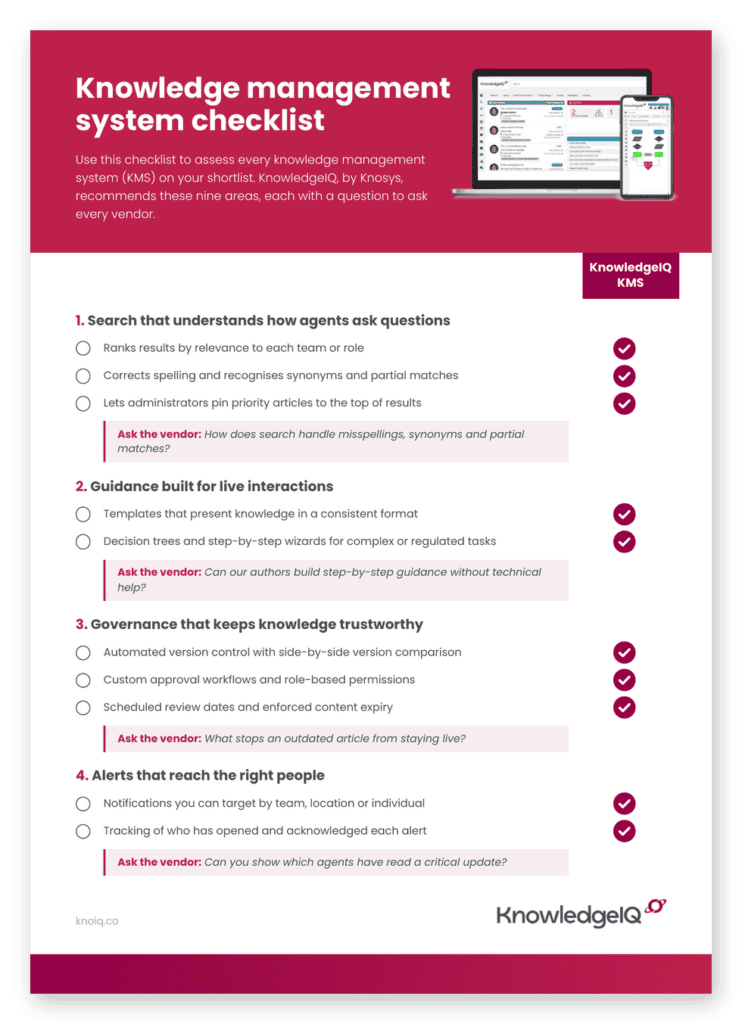
This checklist sets out what to assess and the questions to ask each vendor. Download the KMS checklist to share with your evaluation team.
Finding information remains a daily struggle. A Gartner survey of 4,861 digital workers found that 47% struggle to find the information they need to do their jobs effectively.
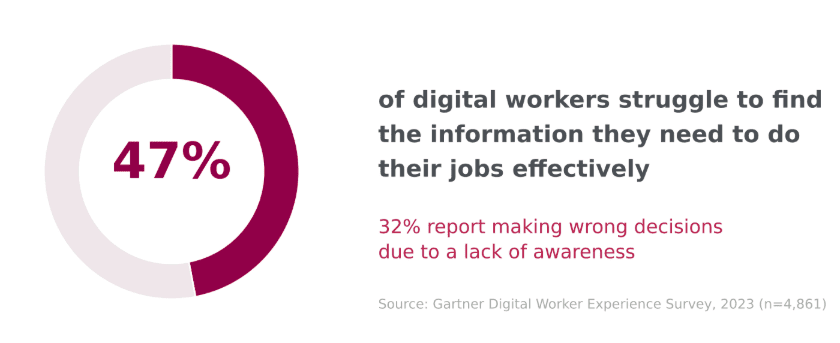
In a contact centre, this cost shows up in every interaction. Agents search several systems while the customer waits. Some escalate the call. Others give an answer that conflicts with the one a colleague gave yesterday.
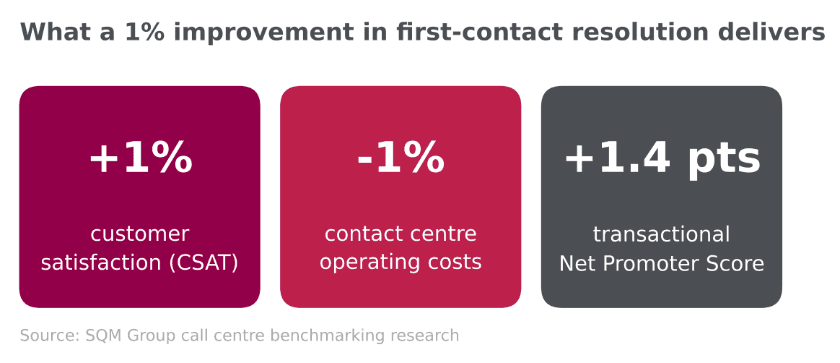
The reward for fixing this is measurable. SQM Group benchmarking research shows that every 1% improvement in first-contact resolution (FCR) delivers a 1% improvement in customer satisfaction.
Start with the results you want the system to deliver. For most contact centre leaders, the list includes higher FCR and customer satisfaction [CSAT], lower average handling time (AHT) without a drop in quality, and faster new-hire productivity. Consistent answers across channels and sites belong on the list too.
Bring three groups into the evaluation. Operations leaders own the business case. Knowledge managers will run the system day to day. Frontline agents will use it during live calls, chats, and emails. Each group sees different risks, and agents will tell you within minutes whether a system works under pressure.
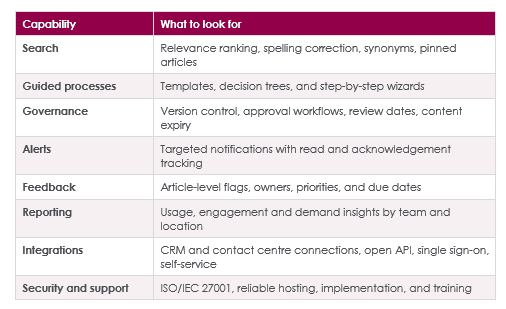
Use these eight points as a scorecard, with a question to put to every shortlisted vendor.
Search is the heart of any KMS. Agents rarely type out the exact title of an article, so the system must return the best match from imperfect queries. Look for relevance ranking by team, automatic spelling correction, synonyms, and the ability to pin priority articles. KnowledgeIQ Smart Search learns a spelling dictionary from your own content and ranks results by relevance to each user group.
Ask the vendor: How does search handle misspellings, synonyms, and partial matches?
Long policy documents slow agents down. Look for templates that present knowledge consistently, plus guided tools for complex or regulated tasks. KnowledgeIQ decision trees and Process Wizards walk agents through each step. Inexperienced staff gain confidence faster, and the organisation gains an audit trail for compliance.
Ask the vendor: Can our authors build step-by-step guidance without technical help?
Agents need confidence that the answer in front of them is current and approved. The KMS should keep every version, support custom approval workflows, and schedule review dates so content does not quietly go out of date. KnowledgeIQ governance includes automated version control, side-by-side version comparison, scheduled publication, and auto review with enforced content expiry.
Ask the vendor: What stops an outdated article from staying live?
New products, policy changes, and service outages need to reach agents in minutes, not days. Look for notifications you can target by team, location or individual, with tracking of who has read them. KnowledgeIQ Alerts arrive in-app or by email and report on who has opened and acknowledged each one.
Ask the vendor: Can you show which agents have read a critical update?
Agents are the first to spot a missing or incorrect answer. The best systems let them flag issues directly against an article and give knowledge managers a clear workflow to act. KnowledgeIQ feedback management assigns owners, priorities, and due dates, with colour-coding that highlights overdue items.
Ask the vendor: How does frontline feedback reach the content owner, and how do authors track it?
Article views alone do not prove value. Look for reporting on usage by team and location, peak demand periods, and engagement with alerts. These insights reveal content gaps and strengthen your business case.
Ask the vendor: Can we analyse engagement across teams, locations, and business units?
Every switch between applications adds time to a call. The KMS should connect with your CRM and contact centre platform, support single sign-on and share the same knowledge with customer self-service channels. KnowledgeIQ offers an open API, single sign-on with providers such as Azure Active Directory and Okta, and integrations with your CX suite.
This matters for AI projects too. AI assistants are only as reliable as the knowledge behind them, so a governed single source of truth comes first.
Ask the vendor: Will the KMS work inside the tools our agents already use?
Confirm security credentials, uptime commitments, and backup and recovery processes. KnowledgeIQ is ISO/IEC 27001 certified through its parent company Knosys, and you can review the details in the Knosys Trust Centre. Then look at the people behind the platform. KnowledgeIQ provides best-practice configuration assistance, plus training for administrators, authors, end users, and internal trainers.
Ask the vendor: What does support look like after go-live?
Price matters, but the cheapest system rarely delivers the best return. Model the impact on your own metrics. A small lift in FCR, a shorter onboarding period or fewer repeat contacts adds up across thousands of interactions each month. Ask each vendor for references from organisations like yours, and review published customer stories.
What is the most important KMS feature for a contact centre?
Search. If agents cannot find the right answer in seconds, every other feature loses its value. Test search with real agent queries during each demonstration.
How is a KMS different from an intranet or document library?
An intranet shares company news and files. A KMS is purpose-built to deliver governed, searchable answers during live work, with version control, review cycles, guided processes, and usage reporting.
Choosing a KMS is a decision your agents and customers will feel every day.
Start by downloading the KMS checklist and sharing it with your evaluation team.
When you are ready, our team would be glad to show you how KnowledgeIQ performs against each point on this list. Book a demo for a no-obligation conversation about your goals.